Data & AI · 4 min
Real-Time Event Streaming in Microsoft Fabric: How It Works, What You Need, and How to Set It Up
Learn how real-time event streaming works in Microsoft Fabric, including Event Streams, Eventhouse, KQL, and Power BI, with a step-by-step setup guide for real-time analytics.

Amrutha Satishkumar
March 18, 2026
Introduction
For a long time analytics was built on batch processing.
Data arrived every few hours.
Pipelines ran on schedules.
Dashboards refreshed periodically.
That worked until systems became operational and expectations changed.
Can we react to events as they happen?This is where real-time event streaming in Microsoft Fabric becomes critical.
Microsoft Fabric now provides a unified way to ingest, process, analyze, and visualize streaming data without stitching together multiple services.
What Real-Time Event Streaming Means
At a system level, real-time event streaming is about processing data as it is generated, with minimal delay.
It includes three core capabilities.
Capturing events as they occur
Processing them continuously
Making them available immediately for analysis or action
An event could be a user interaction, a financial transaction, a sensor signal, or a system log.
Instead of storing data first and analyzing later, streaming systems process data continuously.
Streaming is not faster batch processing. It is continuous data movement.
Core Components for Real-Time Streaming in Microsoft Fabric
Microsoft Fabric provides a set of integrated components that enable real-time analytics.
Event Streams Ingestion and Routing
Event Streams act as the entry point for real-time data in Microsoft Fabric.
They allow you to ingest events from multiple sources such as IoT devices, applications, Kafka, or Azure Event Hubs.
Event Streams also support filtering, transformation, and routing of incoming data.
They function as the pipeline layer for streaming data.
Eventhouse KQL Database for Streaming Storage
Eventhouse is optimized for high-volume event data and time-series workloads.
It is built on KQL, which is designed for fast ingestion and low-latency queries.
Eventhouse is used to store streaming data for analytics scenarios such as logs, telemetry, and operational metrics.
Real-Time Analytics Engine
Fabric includes a real-time analytics engine that enables low-latency querying and aggregations over streaming data.
It supports time-based queries, windowing functions, and pattern detection.
This layer works directly with Eventhouse.
Lakehouse for Hybrid Analytics
In scenarios where streaming data needs to be combined with historical data you can also land events into a Lakehouse.
This enables hybrid analytics using both batch and streaming data.
Power BI for Real-Time Dashboards
Power BI integrates directly with Fabric to provide real-time visualization.
You can build dashboards that auto-refresh, display live metrics, and track trends as events arrive.
How Real-Time Streaming Works in Microsoft Fabric
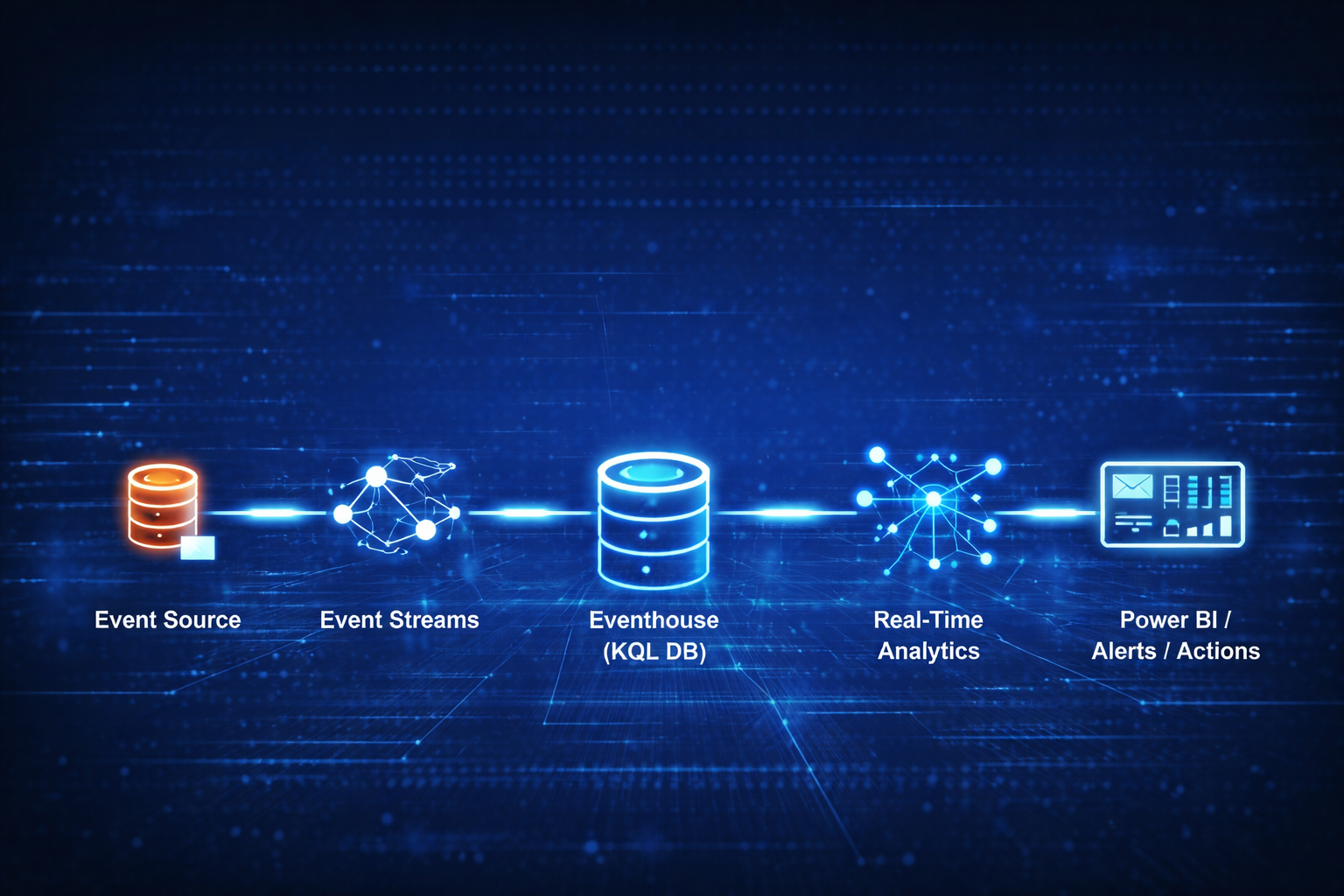
The architecture for real-time streaming in Fabric follows a clear flow.
Event Source
     |
Event Streams
     |
Eventhouse KQL Database
     |
Real-Time Analytics
     |
Power BI dashboards alerts or actions
Each component has a defined responsibility.
1. Event Streams handle ingestion and routing
2. Eventhouse stores and enables fast querying
3. Analytics layer processes streaming data
4. Power BI provides visualization and monitoring
Step-by-Step Setup for Real-Time Streaming in Microsoft Fabric
Step 1 : Create an Event Stream
Go to Real-Time Intelligence inside Microsoft Fabric and create a new Event Stream.
Choose your data source such as Azure Event Hubs, Kafka, or a custom application.
This is where your streaming data enters the system.
Step 2 : Define Transformations
Within Event Streams you can filter and transform incoming data.
For example you can keep only error events or extract specific fields from payloads.
You can also route data to multiple destinations.
Step 3 : Connect to Eventhouse
Create or connect to an Eventhouse database.
Map your incoming event schema to a table.
Fabric handles ingestion scaling, schema alignment, and partitioning automatically.
Step 4 : Query Streaming Data Using KQL
Use KQL to query real-time data.
You can perform time-based filtering, aggregations, and pattern detection.
Example scenarios include monitoring error rates, tracking active users, and detecting anomalies.
Step 5 : Build Real-Time Dashboards
Connect Eventhouse data to Power BI.
Create dashboards that auto-refresh and display live metrics.
This enables continuous monitoring of your system.
Step 6 : Add Alerts and Actions
You can configure alerts based on thresholds and integrate with workflows for automated responses.
This is where streaming becomes operational and actionable.
Where Real-Time Streaming in Fabric Becomes Powerful
Real time streaming enables systems to move from passive reporting to active monitoring.
It supports use cases such as fraud detection, application monitoring, IoT telemetry analysis, and user-behavior tracking.
It allows organizations to detect anomalies immediately, respond to events, and automate workflows.
How Streaming Fits into the Microsoft Fabric Architecture
Real-time streaming is not a separate product bolted onto Fabric. It is part of the same platform as your lakehouse, warehouse, and Power BI, sharing one copy of data in OneLake and one governance model. That is what makes the hybrid pattern practical: an event can trigger a live dashboard the moment it arrives, and also land in the lakehouse for historical analysis, without copying data between systems.
The result is a single architecture that handles both what is happening right now and what happened over time. For teams that need to react in seconds rather than hours, that unification is the whole point.
Sources
- Real-Time Intelligence in Microsoft Fabric (Microsoft Learn)
Streaming does not replace batch analytics. It complements it.
A typical architecture includes:
Eventhouse for real-time data
Lakehouse for historical data
Semantic models for unified analytics
This allows you to analyze what is happening now what happened historically and how they relate.
Key Design Insight for Real-Time Systems
The most common mistake is treating streaming as a faster version of batch pipelines.
Streaming systems require different storage patterns different query models and different expectations.
They are designed for continuous flow rather than static snapshots.
Final Thought
Real time capabilities are becoming essential for modern systems.
However not everything needs to be real-time.
The goal is to identify where immediacy creates value.
Microsoft Fabric simplifies real-time architectures by integrating ingestion storage analytics and visualization into a single platform.
What matters is designing the flow correctly.
FAQ
What is real-time event streaming in Microsoft Fabric
Real time event streaming in Microsoft Fabric refers to capturing processing and analyzing data as it is generated using Event Streams Eventhouse and Power BI.
What is Eventhouse in Microsoft Fabric
Eventhouse is a KQL based database optimized for high-volume event data and time-series analytics with fast ingestion and querying capabilities.
Can Microsoft Fabric handle real-time analytics
Yes Microsoft Fabric provides built in real-time analytics capabilities through Event Streams Eventhouse and integrated Power BI dashboards.
Do I need a Lakehouse for streaming in Fabric
No but it is useful when combining streaming data with historical batch data for hybrid analytics scenarios.
Amrutha Satishkumar
Data & AI Solution Engineer at Microsoft